Virtual Private Networks (or VPN’s) are tools used to enhance privacy, when online. A VPN encrypts your browsing activity and masks your IP address – this gives the user more privacy and will allow users the capacity to bypass censorship, network restrictions and access geographical restricted content.
Whilst there are legal and legitimate uses for a VPN, unfortunately these tools can be used as a way of accessing restricted content and bypassing network restrictions both at school and at home.
What you can do at home
- Encourage open and honest dialogue with your children regarding appropriate use of their devices.
- It is recommended that you invest in a trusted antivirus/antimalware/antispyware application to add an additional layer of security to your home network.
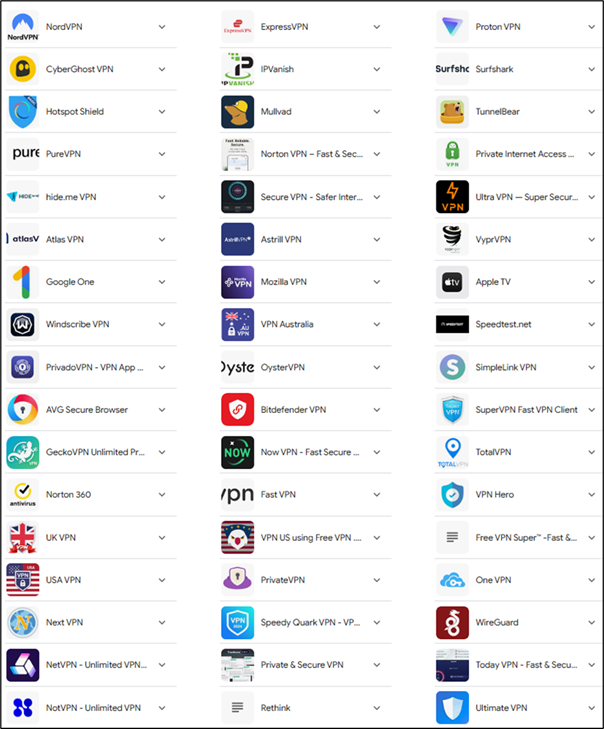
- Familiarise yourself with the common VPN applications, if you find them on your child’s devices – delete them.
- On an iPad if a VPN is installed and in use, you see the letters VPN next to the Wi-Fi symbol in the top right-hand corner of the device.
How to Check for VPN Applications:
- On Mobile Devices:
- iOS (iPhone/iPad): Navigate to Settings > General > VPN & Device Management to see if a VPN is configured.
- Android: Go to Settings > Network & Internet > VPN to view active VPNs.
- On Computers:
- Windows: Check the system tray for VPN icons or go to Settings > Network & Internet > VPN.
- macOS: Look for VPN symbols in the menu bar or check System Preferences > Network for VPN configurations.
Additional Resources
- BeLearning Lounge: Head to the Cyber safety information and resources for parents tab or the variety of resources found on this page.
- Bark’s Guide on VPNs: Offers insights into why children use VPNs and how parents can detect and manage such usage.
- The White Hatter’s Parent Guide to VPNs: Provides a comprehensive overview of VPNs and their implications for parental controls.
Pictured below are the most common VPNs in use at present